ID Verification for Background Checks Screen the Right Person, Every Time
A background check is only as good as the name and date of birth it runs on. Sure Check’s ID verification reads both straight from your candidate’s government ID, so a typo or a borrowed identity cannot send the search to the wrong records.
ID verifiedSearches now run on the name and date of birth from the ID.
Why the Name and Date of Birth Matter So Much
Court records are matched on name and date of birth. If a candidate types their name differently, leaves out a middle name or enters the wrong birth date, a real record can be missed, even when the Social Security number is valid.
The SSN trace is still important. It shows the names and addresses linked to a Social Security number and decides which counties get searched. But it does not confirm a date of birth. ID verification closes that gap. The two work best together.
Mismatched identities are a real problem in this industry. The Consumer Financial Protection Bureau has warned background screeners about reports that attach the wrong person’s records, and the Fair Credit Reporting Act requires reasonable procedures for accuracy.
ID verification is an add-on. Add it to any package so the searches you already order run on verified information.
Locks in the legal name
The name and date of birth come from the ID and cannot be changed by the candidate.
Flags fake or altered IDs
The system checks for signs of tampering and counterfeit documents.
Cuts data entry errors
Details are pulled from the document, so there is less typing for your team and the candidate.
Great for remote hiring
Confirm identity for candidates you may never meet in person before they start.
How ID Verification Works
It fits into the email invitation your candidate already completes, so there is nothing extra for your team to do.
Add it to your package
Tell us which packages should include ID verification and we add it for you at no setup cost.
Send the invitation
Your candidate gets the usual email invitation to complete their background check and sign the authorization.
Candidate uploads their ID
They photograph a driver’s license or state ID (front and back) or a passport (photo page only).
Searches run on verified data
Once the ID is verified, every search uses the name and date of birth from the document.
Download the ID Verification Guide to learn more.
Download the GuideWhat Your Candidate Sees
The process takes a couple of minutes on a phone or computer. Files can be JPG, PNG, HEIC or HEIF, up to 10 MB per side.
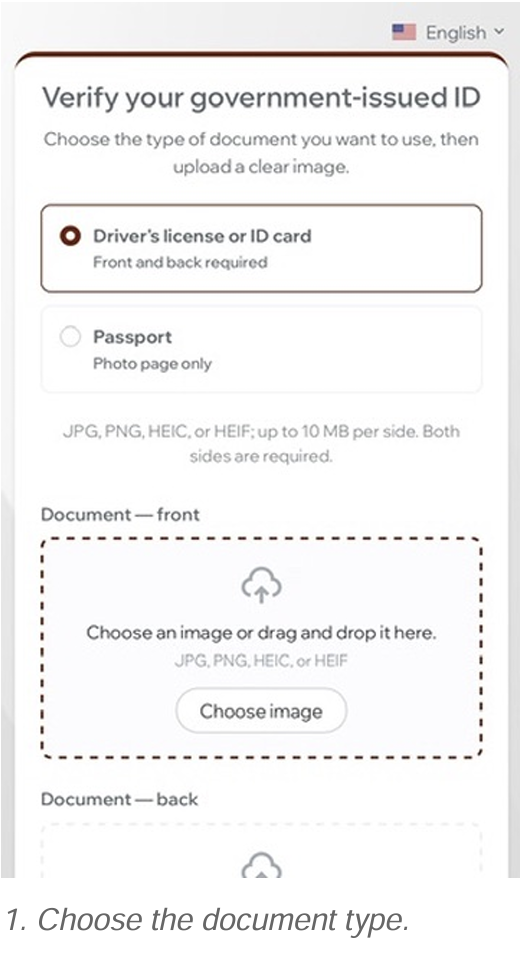
1. Choose the document
The candidate picks a driver’s license or ID card, or a passport.
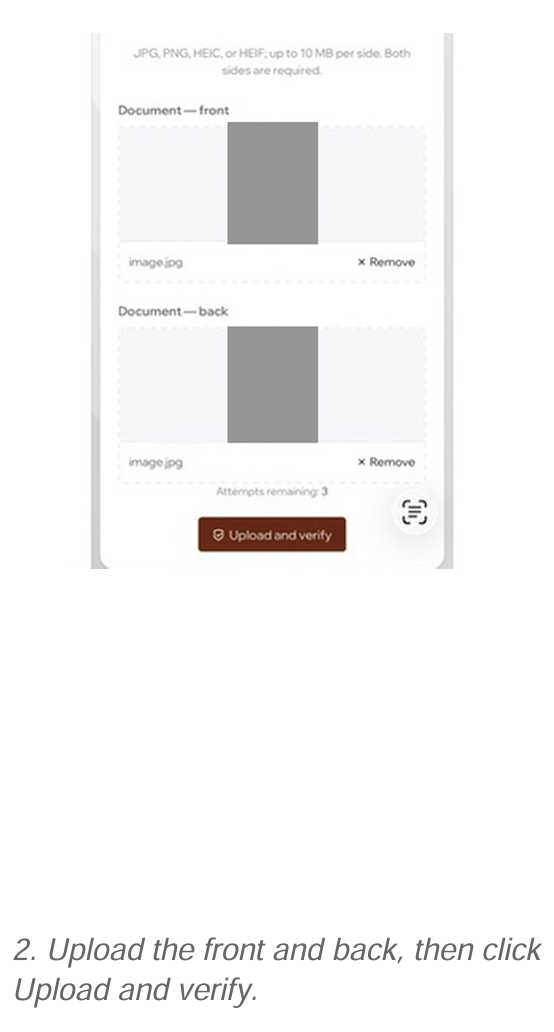
2. Upload the ID
They upload the front and back, then click Upload and verify. Three attempts are allowed.
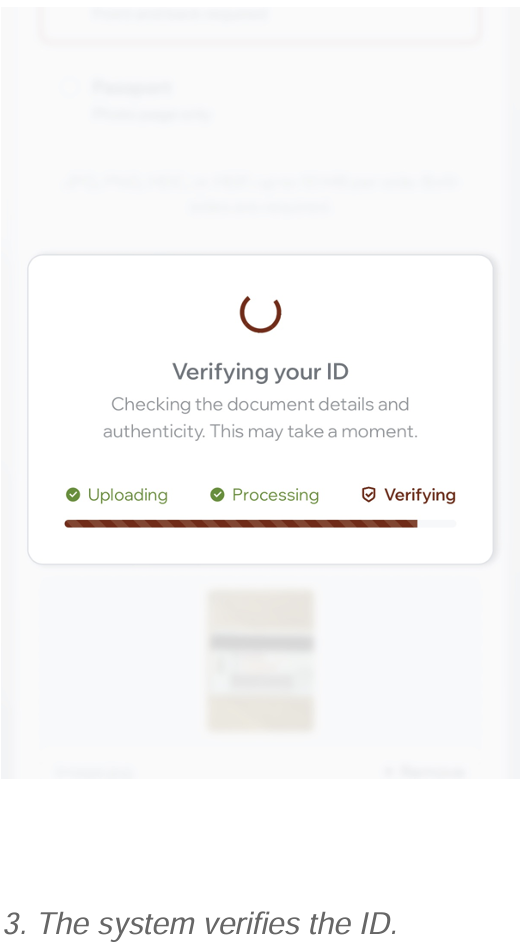
3. Automatic check
The system checks the document details and authenticity, then the background check continues.
Which IDs Are Accepted?
Accepted
- U.S. driver’s licenses and state ID cards
- U.S. passports
- Canadian driver’s licenses and provincial ID cards
- Canadian passports
Not accepted
- Passports and IDs from any other country
- Green cards (Permanent Resident Cards)
- Work permits, school IDs and employee badges
No accepted ID? Place the order manually or send the invitation without ID verification. See our guide to background checks without an SSN for candidates who are new to the U.S.
When the Name on the ID Doesn’t Match
Sometimes the name entered for a candidate is a nickname, a typo or a maiden name. What happens next depends on who pays for the invitation.
Always order using the candidate’s full legal name. It keeps orders moving and avoids a review hold.
The name you entered is not added as an alias, since it may just be a typo. Aliases still come from the SSN trace and can be added to the report if you want them.
Your company pays
The order is held and you get an email with a link to review and approve it. No searches are submitted until you approve.
The candidate pays
The name is updated to match the ID automatically before any searches run, and the order continues as normal.
Built With Privacy in Mind
Secure storage
ID images are stored on a secure server, never in a public web folder, so they cannot be opened from a public link.
Deleted after 30 days
ID images are automatically deleted 30 days after upload.
No selfies or face scans
We check the document only. There is no selfie, liveness check or face match.
Who Uses ID Verification?
Clients most often add it for higher-risk or remote roles, or simply to cut down on data entry errors.
Staffing agencies
Place candidates faster with fewer order corrections, even when you hire across many branches. Staffing screening
Nanny and caregiver agencies
Know the person going into a client’s home is who they say they are. Nanny background checks
Gig and hourly employers
Confirm identity for workers who apply and onboard entirely online. Hourly and gig screening
ID verification is one part of our verification services. Pair it with criminal background checks in a custom package built for each role. Questions about how it fits your hiring? Our compliance team knows FCRA and background check laws in every state. Meet the Sure Check team.
What Our Clients Say
5.0 on Google from 19 reviews
“Turnaround times are consistently same-day, which keeps our onboarding moving and our clients from waiting. When there’s ever a question on a report, we get a real person who knows the product, not a ticket system.”
“Sure Check Background Screening has been invaluable for giving peace of mind to families we work with. It is easy to use and candidates find it simple, which is key!”
“We were in need of quick but accurate background checks to complete our staff requirements for our Summer Camp ministry, and they delivered just what they promised…and with great customer service!”
“The system is easy to use and reps are easily available when you have questions. One of my favorite things is all the supporting documents that help us stay HR compliant in this ever changing landscape.”
“I am a volunteer coordinator and am so happy to have an option for potential volunteer drivers to not have to get a background check through inconvenient methods.”
“It was easy to set up an account and the results came very fast. About half the price of other options I saw online. Great service!”
ID Verification FAQs
What is ID verification in a background check?
ID verification checks a candidate’s government-issued ID during their background check invitation. The candidate uploads a photo of their ID, the system checks it for signs of tampering, and their legal name and date of birth are read straight from the document. The background check then runs on that name and date of birth.
How much does ID verification cost?
ID verification is $4 per verification. You are only billed when a verification is completed. Candidates get three attempts, so a retry never costs you extra.
Which IDs are accepted?
Driver’s licenses, state ID cards and passports issued by the United States or Canada. IDs and passports from other countries are not accepted, and a green card (Permanent Resident Card) is not on the list.
What if my candidate does not have an accepted ID?
Place the order manually, or send the invitation without ID verification. ID verification only runs on email invitations, so it is skipped on manual orders.
Does ID verification include a selfie or face match?
No. There is no selfie, liveness check or face match. ID verification checks the document itself and reads the name and date of birth from it.
What happens if the name on the ID is different from the name I entered?
On invitations your company pays for, the order is held and you get an email to review and approve it before any searches run. On invitations the candidate pays for, the name is updated to match the ID automatically and the order continues. To avoid delays, always order using the candidate’s full legal name.
What happens if a candidate fails all three attempts?
Have the candidate contact our customer service team so we can review it. If needed, you can send a new invitation, with or without ID verification.
How long are ID images kept?
ID images are stored on a secure server that cannot be reached by a public link, and they are deleted 30 days after upload.
The address on the candidate’s ID is old. Does that matter?
No. ID verification confirms who the candidate is and locks in their legal name and date of birth. The address history used to choose which counties to search comes from the SSN trace, not the ID.
Can I run ID verification on its own?
No. ID verification is an add-on that protects the searches in your package, such as county and nationwide criminal searches. Add it to any package you already use.
Add ID Verification to Your Packages
Create your account and tell us which packages should include ID verification. We’ll set it up for you.